Features

Everything your front desk needs, and an AI scribe for your providers

Calls, texts, forms and follow-ups become requests your team can see, sort and close. In the exam room, the AI scribe drafts the visit note. Here is each part, with real screens from the app.

01Assist

24/7 AI agents for calls and texts

APY's AI agents answer phone calls, SMS and WhatsApp messages 24/7, in English and Spanish, and turn what the patient needs into a request in the Lobby.

  • Voice, SMS and WhatsApp agents, each with an activity log of what they handled.
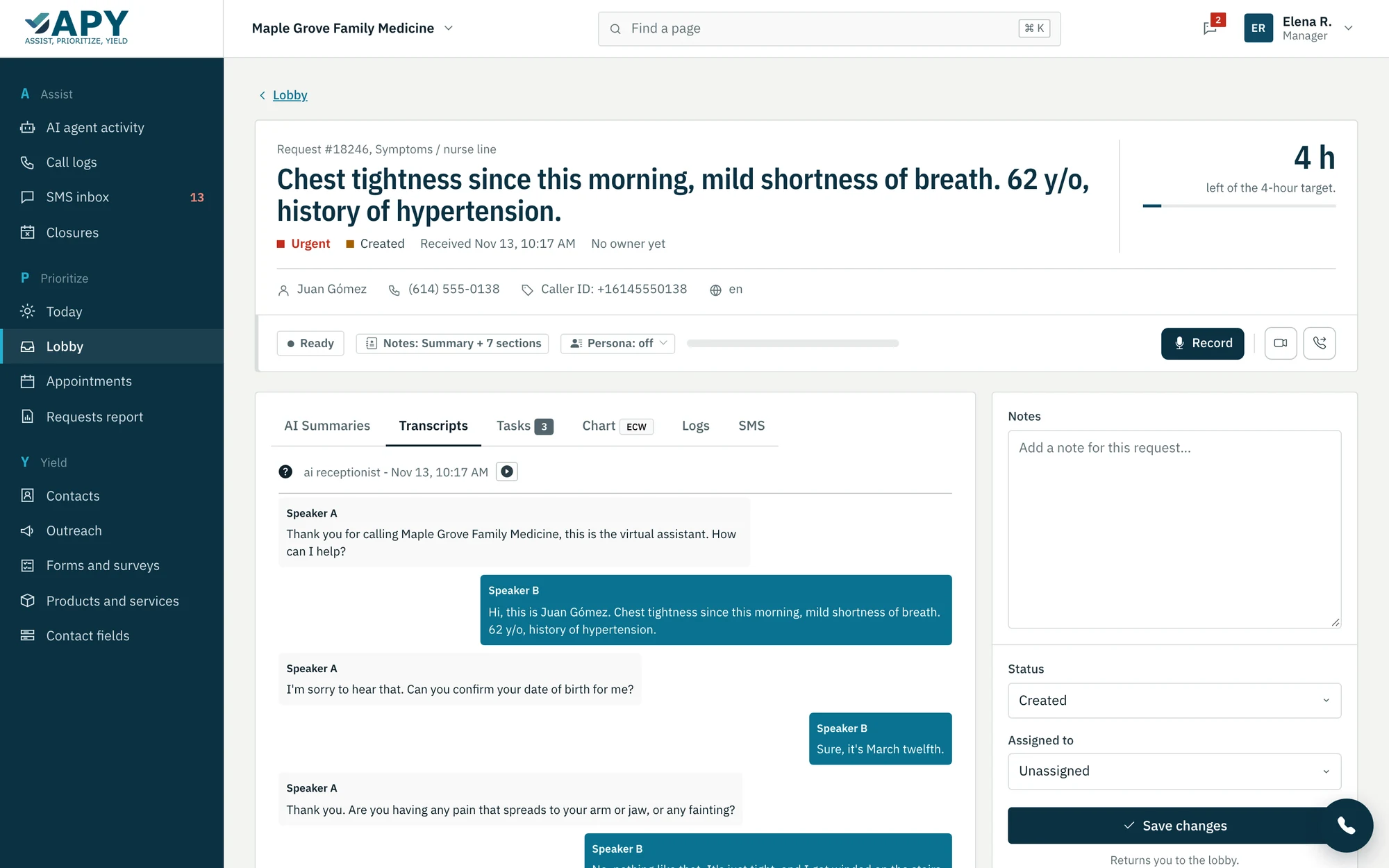
  • Every call gets an AI summary and a speaker-by-speaker transcript.
  • Requests that need attention quickly are flagged as urgent.
  • The agents are told about holidays and reduced hours.
  • Staff call patients back from the browser with the built-in dialer.
Where did that call go? (20 s)Demo data, fictional. Music: "Easy Lemon" by Kevin MacLeod (incompetech.com), licensed under CC BY 4.0.
Read the transcript

Phones ringing, voicemail full, patients waiting?

Our AI agents answer 24/7, in English and Spanish.

Every call becomes a request with an AI summary,

sorted so the urgent ones come first.

Every call is logged, with the recording and transcript.

Call back right from the browser.

Learn more at apytechnologies.com.

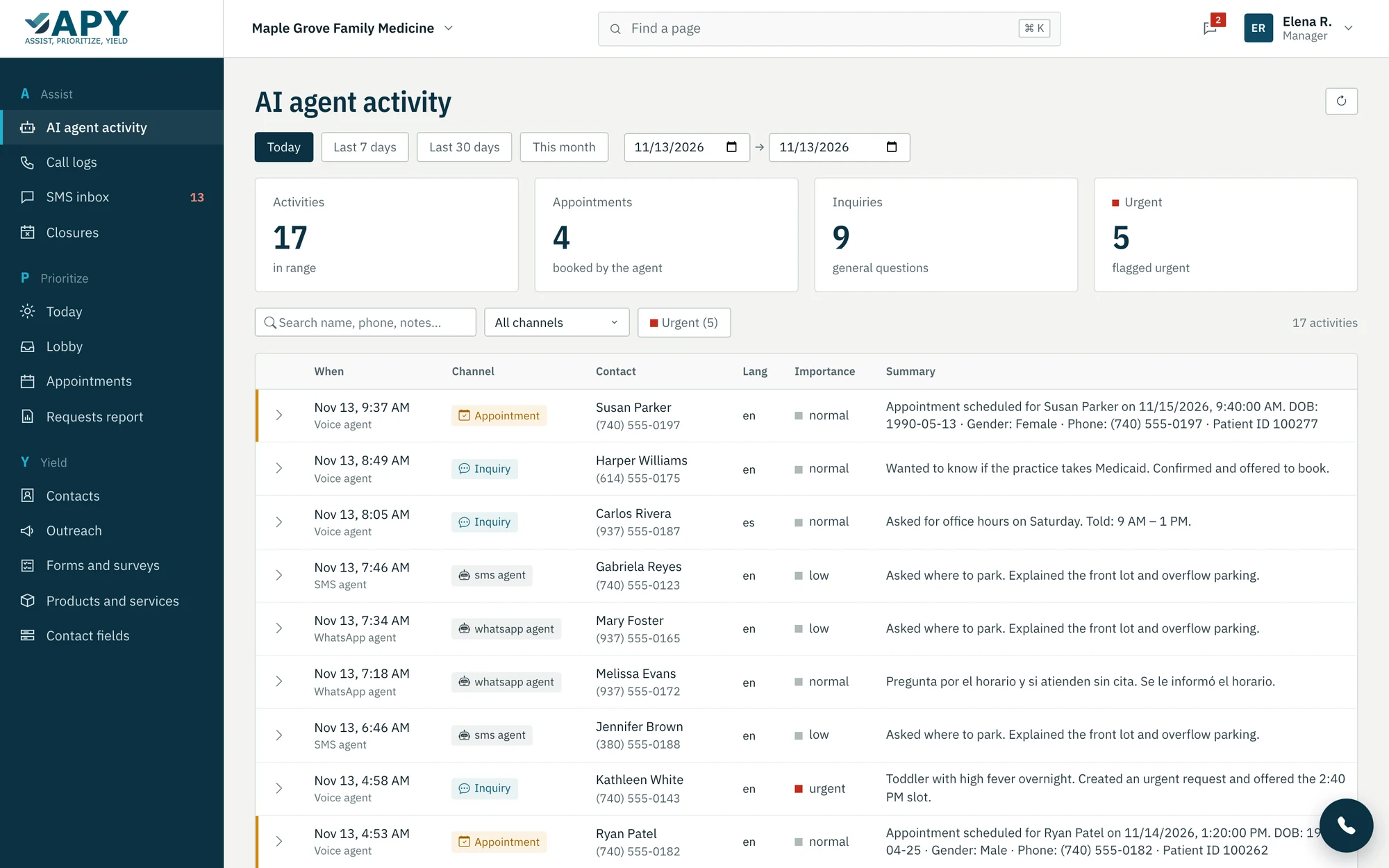
AI agent activity: totals for the voice, SMS and WhatsApp agents and a list of conversations they handled, some flagged urgent.
AI agent activityDemo data, fictional
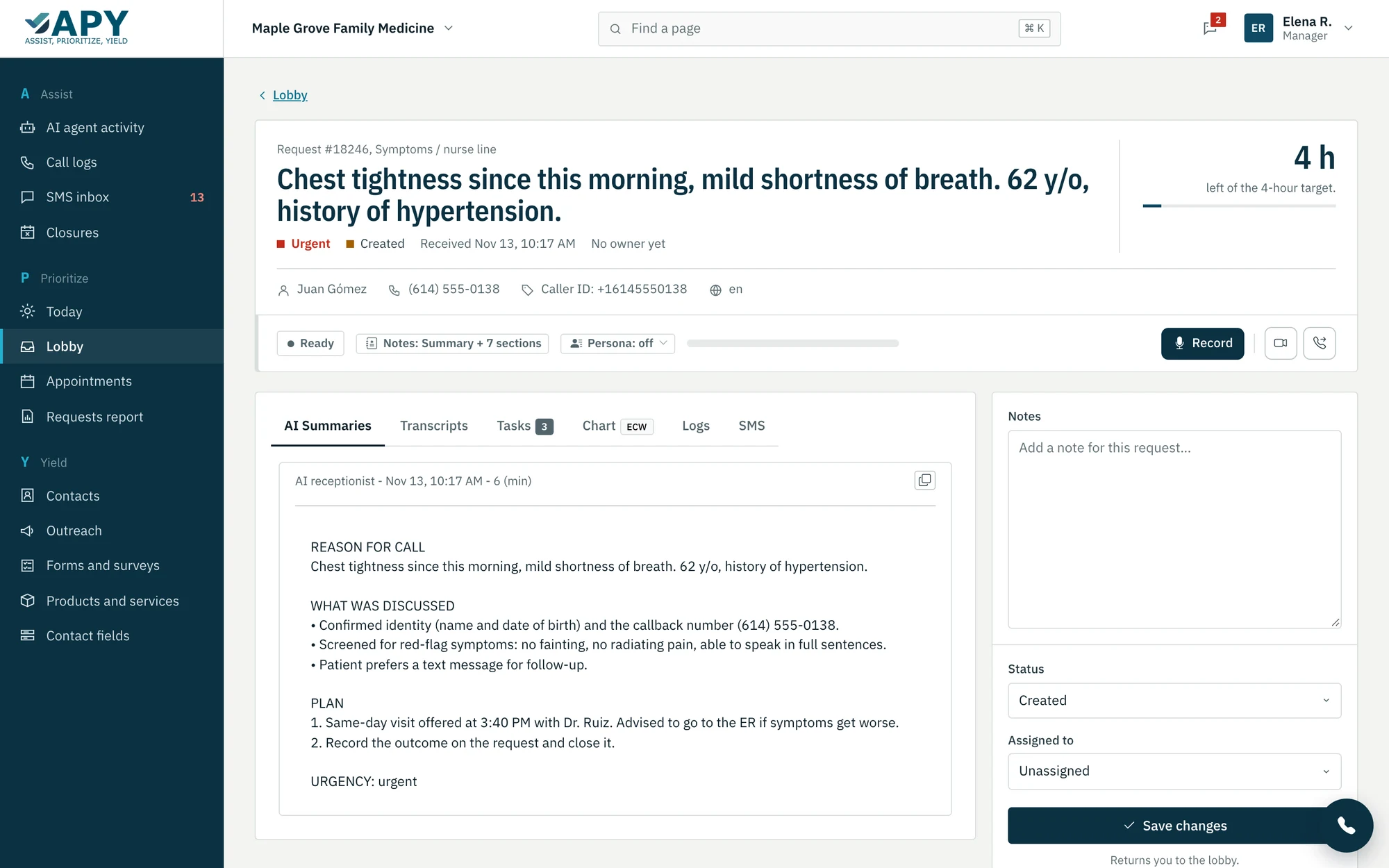
A request created from a call, with an AI summary of what the caller needs.
AI summary on a requestDemo data, fictional
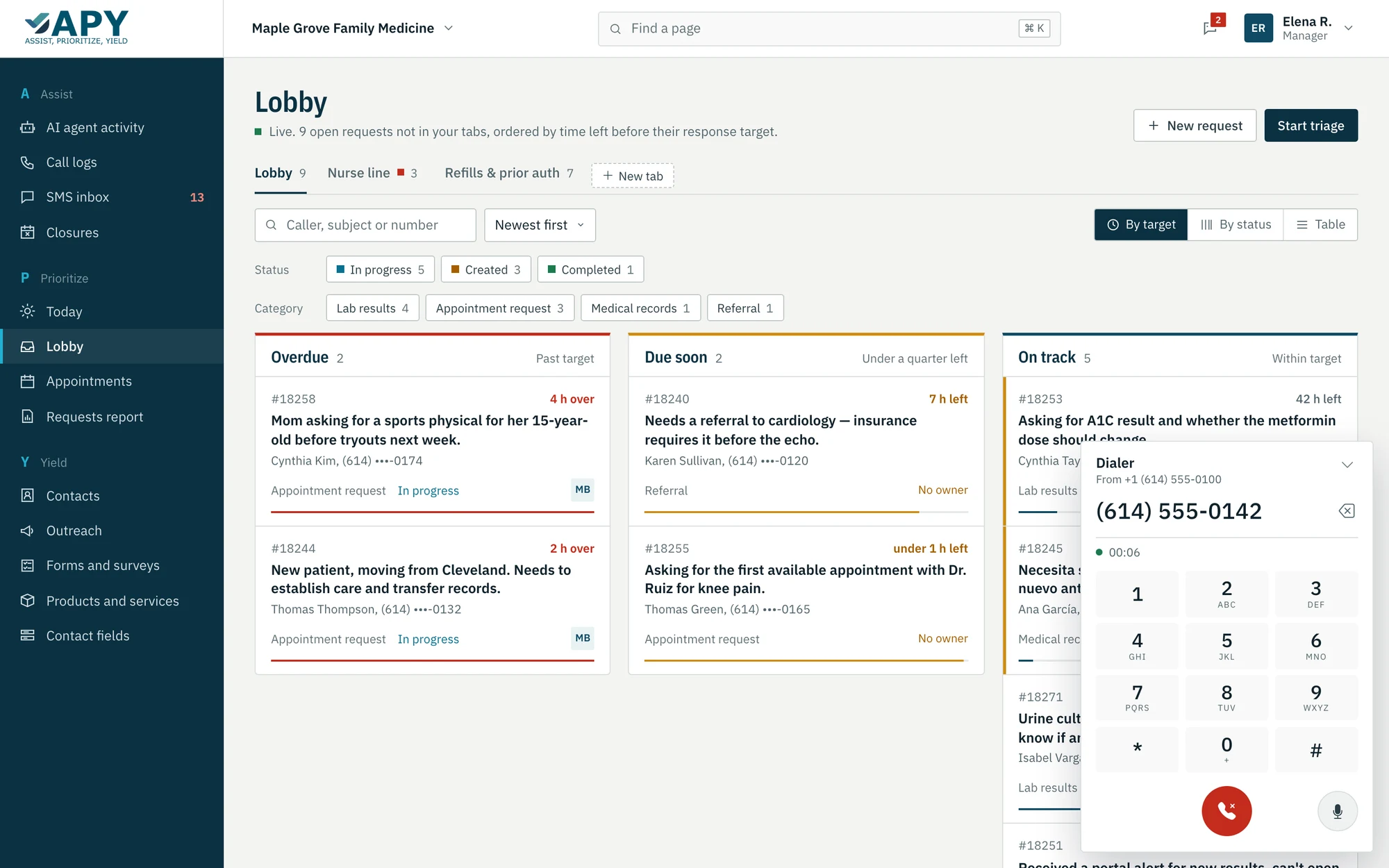
The built-in dialer during a live call, with a call timer and call controls.
Calling back from the browserDemo data, fictional

02Yield

AI scribe: talk with your patient, APY drafts the note

Record the visit in the browser, in the exam room or on a video visit. AI transcribes the conversation and drafts a structured note, and the note is written back into the EHR.

  1. Record

    One click from the patient's request, in the browser

  2. Transcribe

    AI writes a speaker-by-speaker transcript of the visit

  3. Draft

    A note in your EHR's sections, follow-up tasks and suggested ICD/CPT codes

  4. Back to the EHR

    The note is written back into the EHR, and the transcript stays on the request

It's a draft. AI output can contain mistakes. ICD/CPT codes are shown to the provider as suggestions.

  • The draft note appears on the patient's request when processing finishes.
  • The note follows your EHR's sections and is written back into eClinicalWorks and DrChrono. Other EHRs can be connected on request.
  • Each person can save writing styles, such as a SOAP note or a patient-friendly recap.
  • Follow-up tasks are created from the visit, and the full transcript stays on the request.
  • AI-suggested ICD/CPT codes, shown to the provider as suggestions.
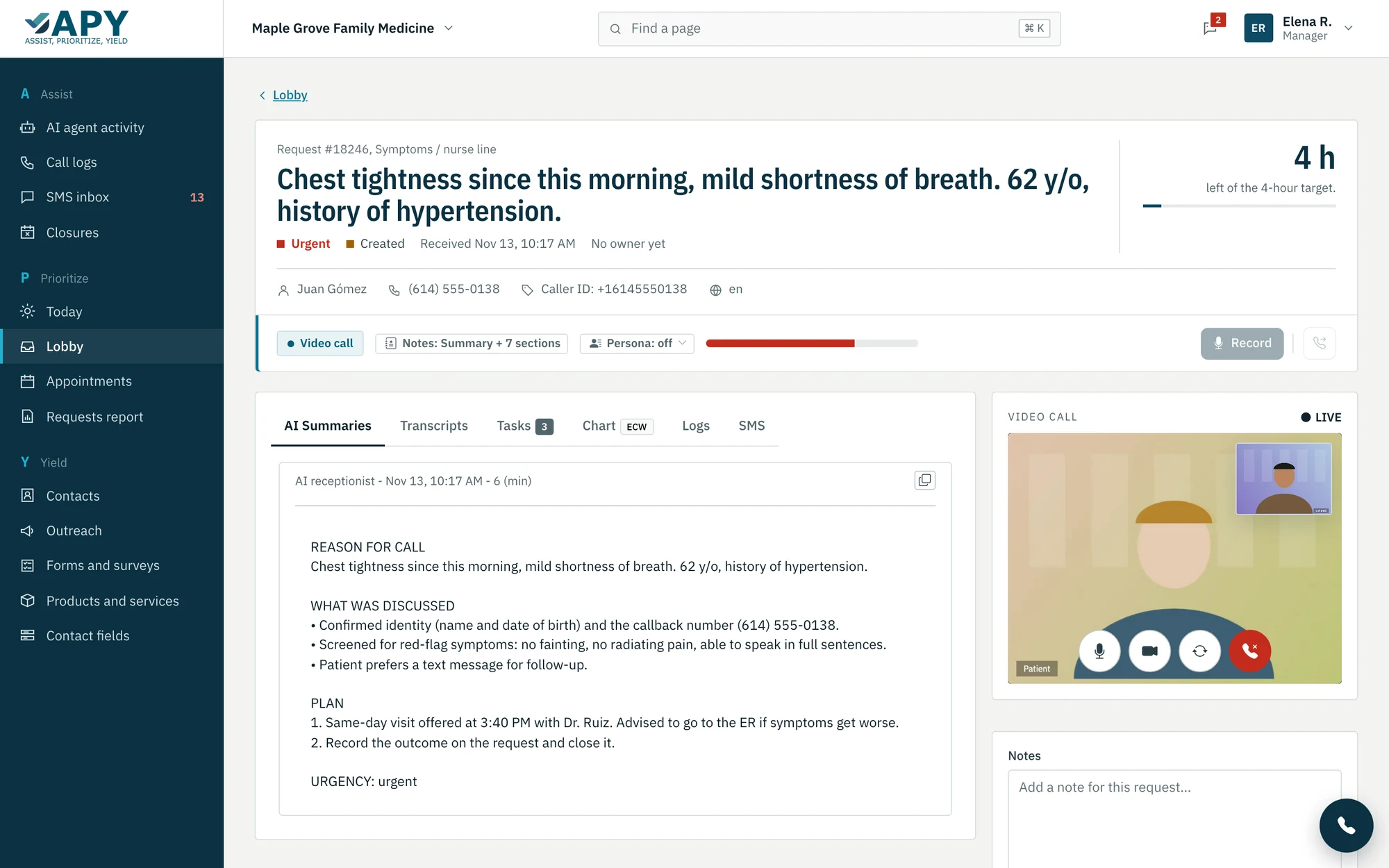
  • Works on video visits too: start the visit from the request, then record.
Record the visit, get the note (23 s)Demo data, fictional. Music: "Easy Lemon" by Kevin MacLeod (incompetech.com), licensed under CC BY 4.0.
Read the transcript

Still writing notes after the last patient leaves?

Open the patient's request,

press Record, and talk with your patient.

When you stop, AI transcribes and summarizes the visit

into a structured note you review, then it goes back into your EHR.

Follow-up tasks are created for you,

and the full transcript stays on the request.

Learn more at apytechnologies.com.

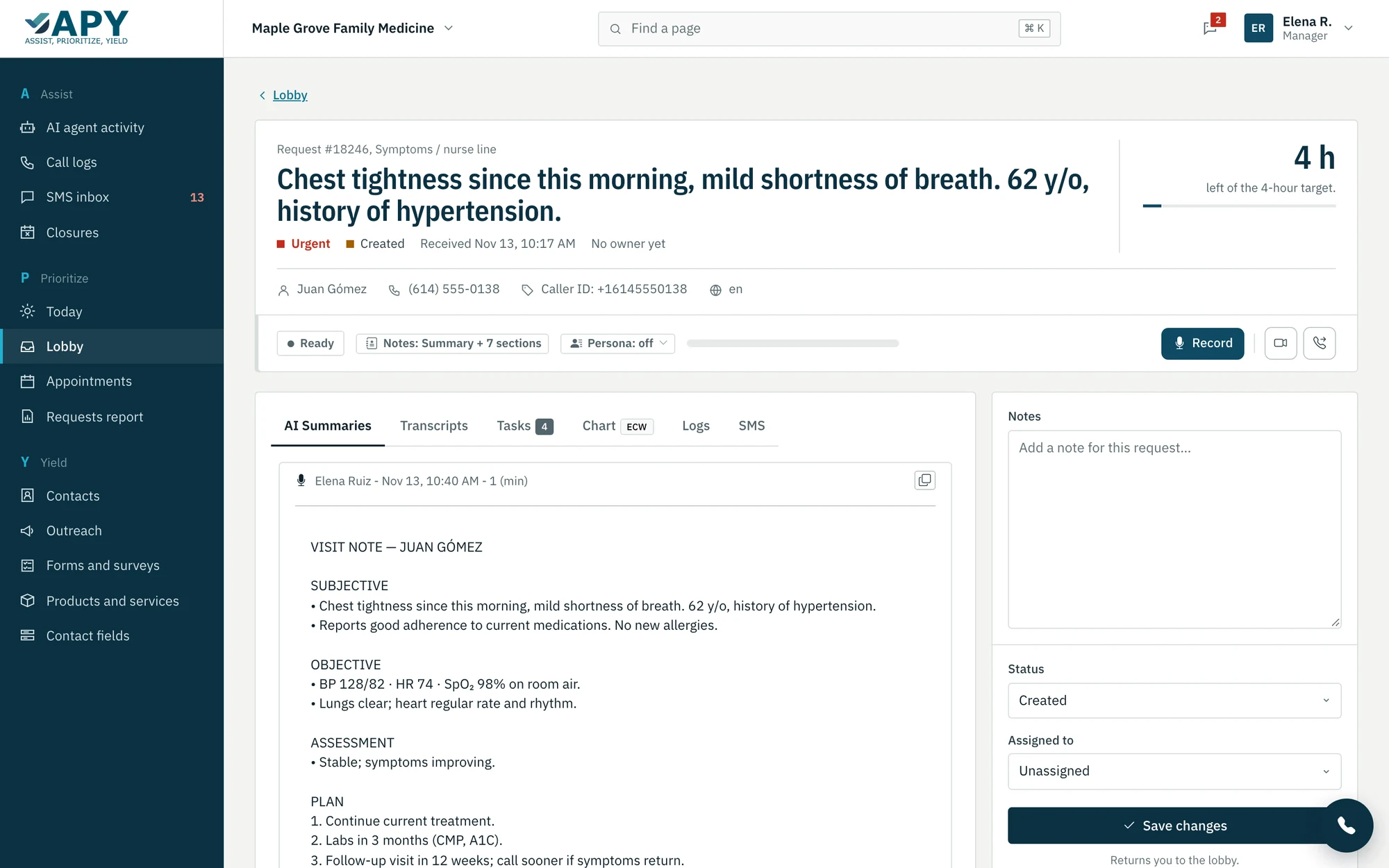
A draft visit note generated from a recording, organized in sections.
Draft visit note from a recordingDemo data, fictional
A provider's video visit screen started from a request, with the Record button.
Recording a video visitDemo data, fictional
A visit transcript in APY, split by speaker.
Speaker-by-speaker transcriptDemo data, fictional

03Prioritize

Lobby triage with response targets

Every request lands in the Lobby and is sorted against its category's response target, so the team works the most pressing requests first.

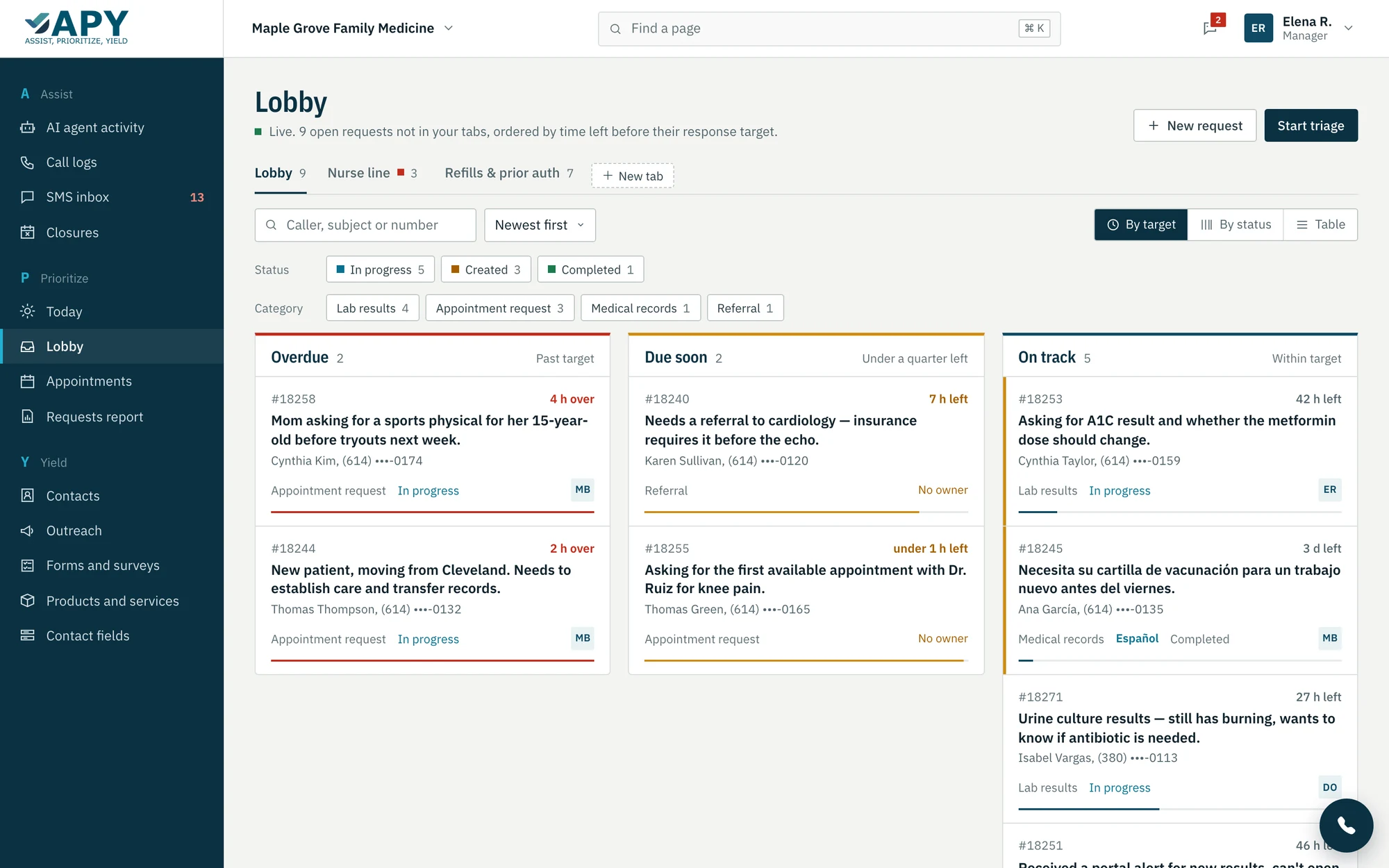
  • Three lanes: Overdue, Due soon and On track, with time left or time over on each card.
  • Urgent requests are flagged, and each request shows its owner, or a button to take it.
  • Teams save their own tabs, for example a nurse line or refills.
  • Spanish-language requests carry an Español tag.
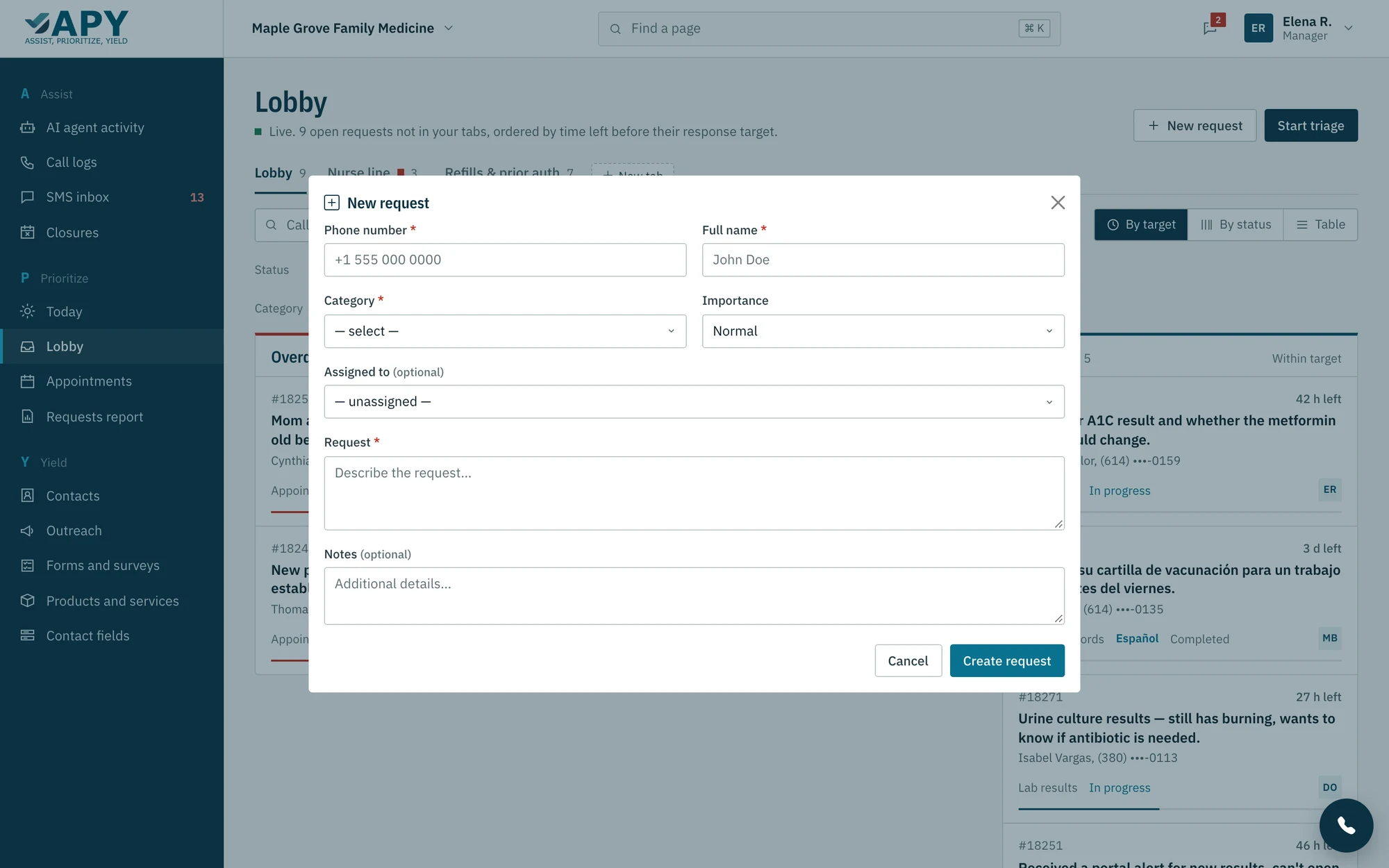
  • Staff log walk-in or phone requests by hand.
The Lobby with request cards in Overdue, Due soon and On track lanes.
The Lobby, by response targetDemo data, fictional
The New request form for logging a request by hand: caller, category, importance and details.
Logging a request by handDemo data, fictional

04Assist

SMS and WhatsApp in one shared inbox

Patient texts and WhatsApp messages arrive in one inbox the whole team can see, instead of scattered across personal phones.

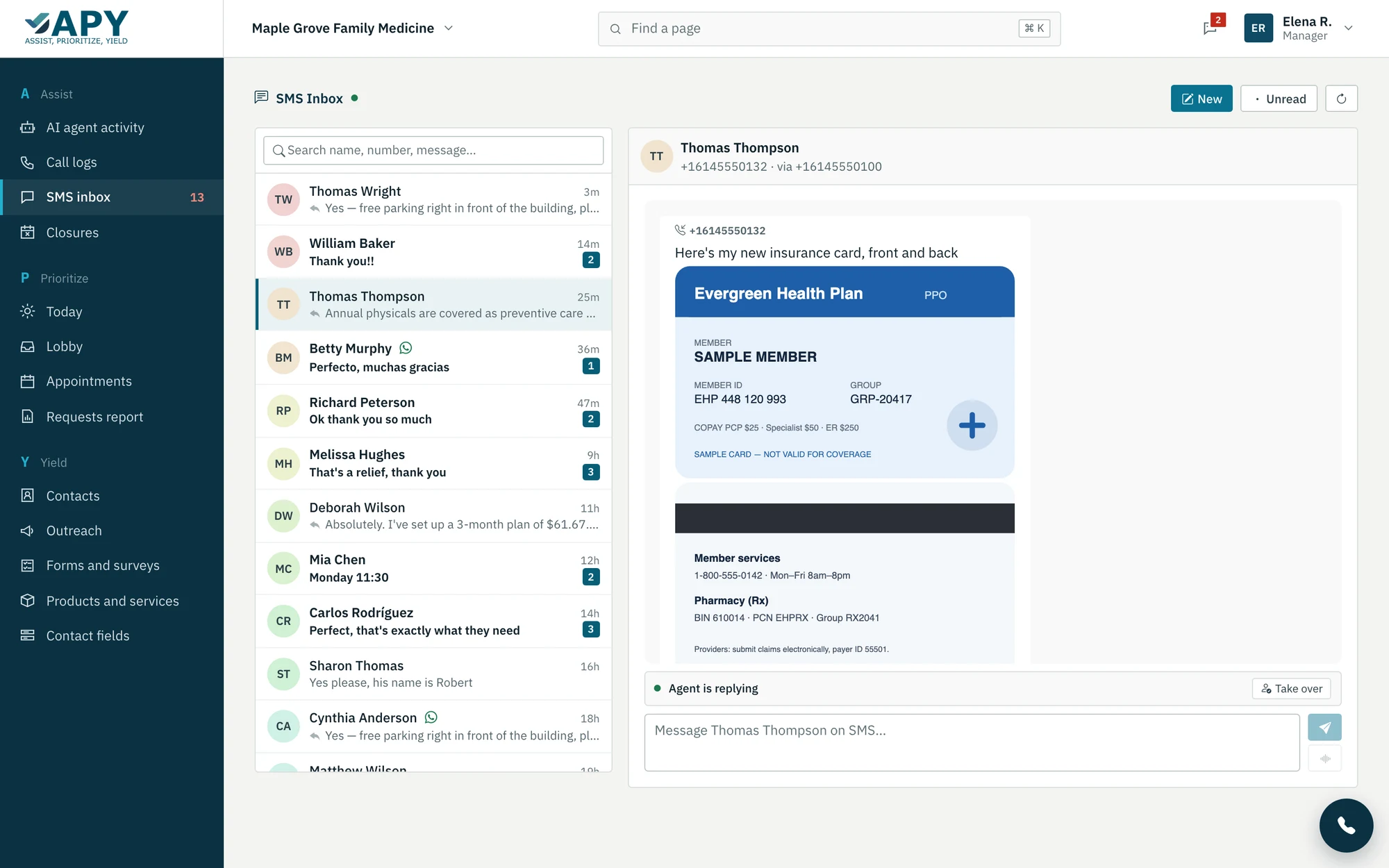
  • Threads include photos, such as an insurance card.
  • Unread counts, and a desktop alert when a patient writes.
  • An AI agent can reply, and staff can take over a conversation at any time.
  • Consent is tracked per number (opted in, opted out or not asked), with a one-click opt-in request.
One inbox for SMS and WhatsApp (22 s)Demo data, fictional. Music: "Easy Lemon" by Kevin MacLeod (incompetech.com), licensed under CC BY 4.0.
Read the transcript

Patients text your office. Who answers?

New messages show up wherever you are in APY.

SMS and WhatsApp share one inbox, photos included.

An AI agent replies 24/7, and you can take over anytime.

Reply from the shared inbox,

or start a new conversation.

Learn more at apytechnologies.com.

The SMS inbox: a list of patient threads and an open conversation with insurance card photos and a Take over button.
Shared SMS and WhatsApp inboxDemo data, fictional

05Yield

Outreach campaigns, reminders and surveys

Reach groups of patients with reminders, recalls and surveys, and see who received the message and who replied.

  • Choose contacts by tag or custom field, then send by SMS, voice call, WhatsApp or email, now or on a schedule.
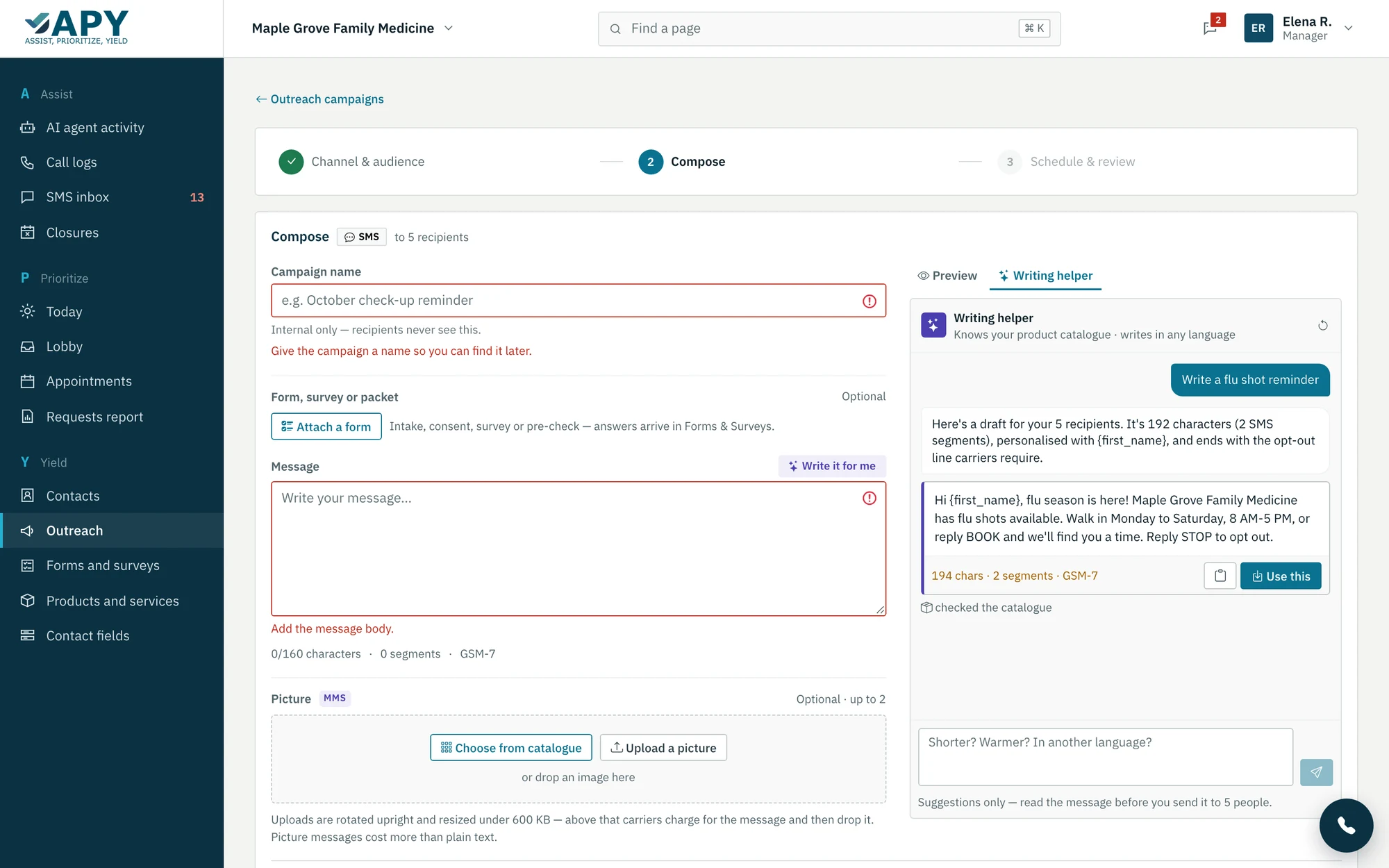
  • An AI writing helper drafts the message, in any language. Attach a picture from your own catalogue.
  • Automated appointment reminders and confirmations.
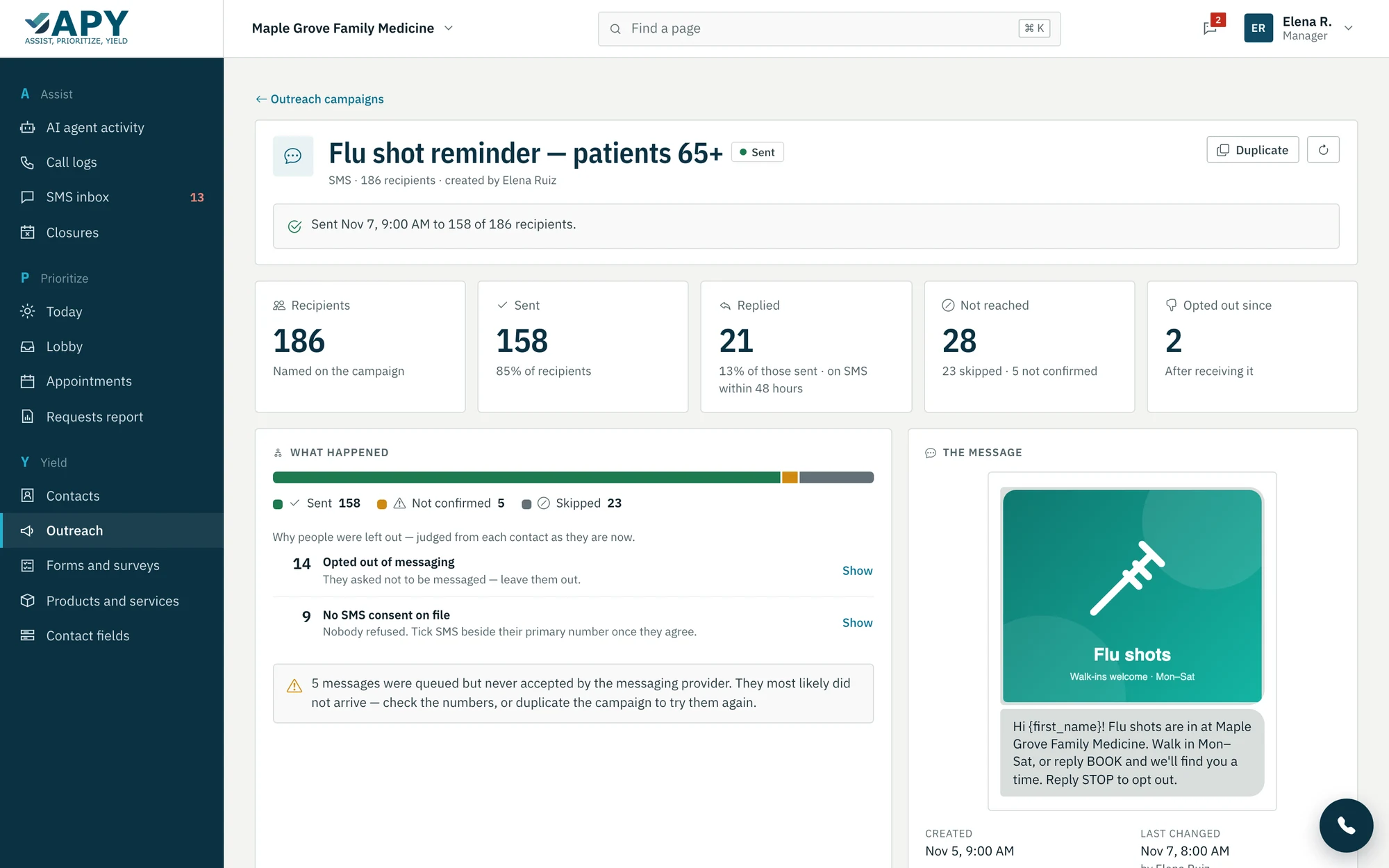
  • Results show who received the message, who replied and who was skipped, and why (for example, no SMS consent on file).
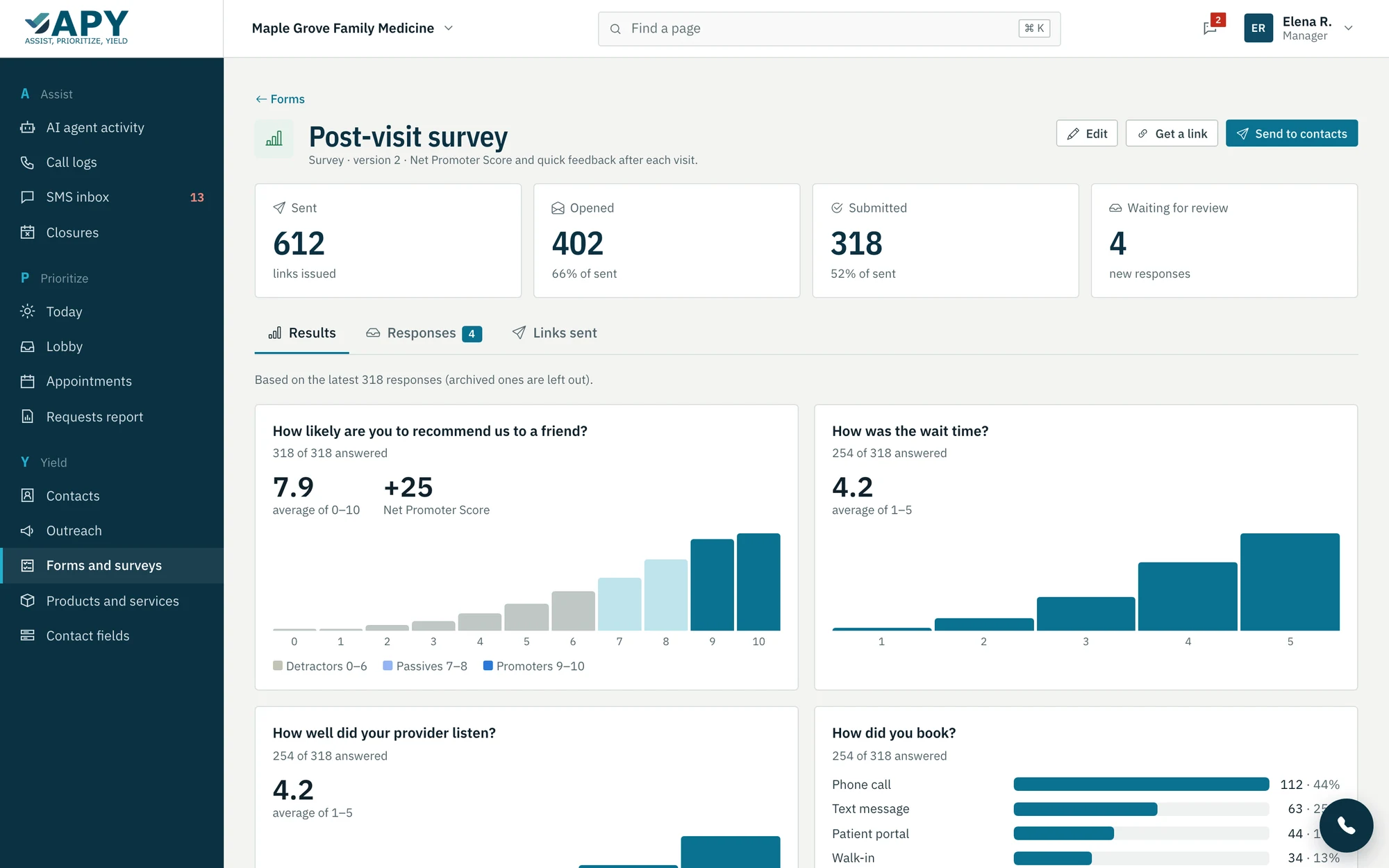
  • Surveys show a recommend score and a chart for each question.
  • After the visit, invite happy patients to leave a Google review. Coming soon
A flu shot campaign (20 s)Demo data, fictional. Music: "Easy Lemon" by Kevin MacLeod (incompetech.com), licensed under CC BY 4.0.
Read the transcript

Flu season, and a long list of patients to remind.

Pick patients by tag or custom field,

choose SMS, voice, WhatsApp or email,

and let the writing helper draft the message.

Afterwards, see who got it, who replied and who was skipped.

Then ask patients how the visit went.

Learn more at apytechnologies.com.

The outreach composer: channel, recipients and the AI writing helper drafting a flu shot reminder.
Composer with writing helperDemo data, fictional
Campaign results for a flu shot reminder: sent, replied, not reached and opted out.
Campaign resultsDemo data, fictional
Post-visit survey results with a recommend score and charts per question.
Survey resultsDemo data, fictional

06Yield

Digital intake forms on the patient's phone

Send intake forms, consents, pre-visit check-ins and surveys as a link, instead of handing out clipboards.

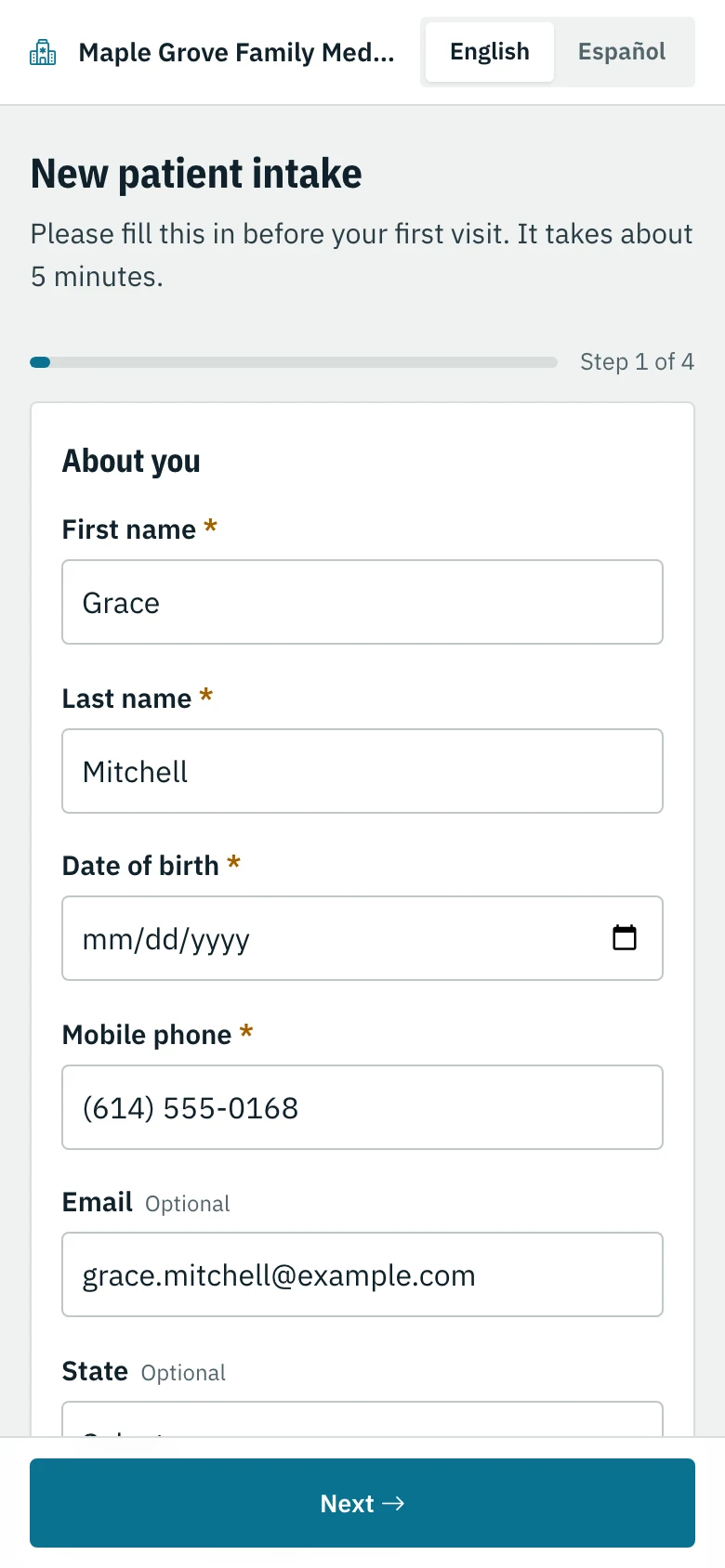
  • Patients fill them on their phone, in English or Spanish, with an insurance-card photo and a signature.
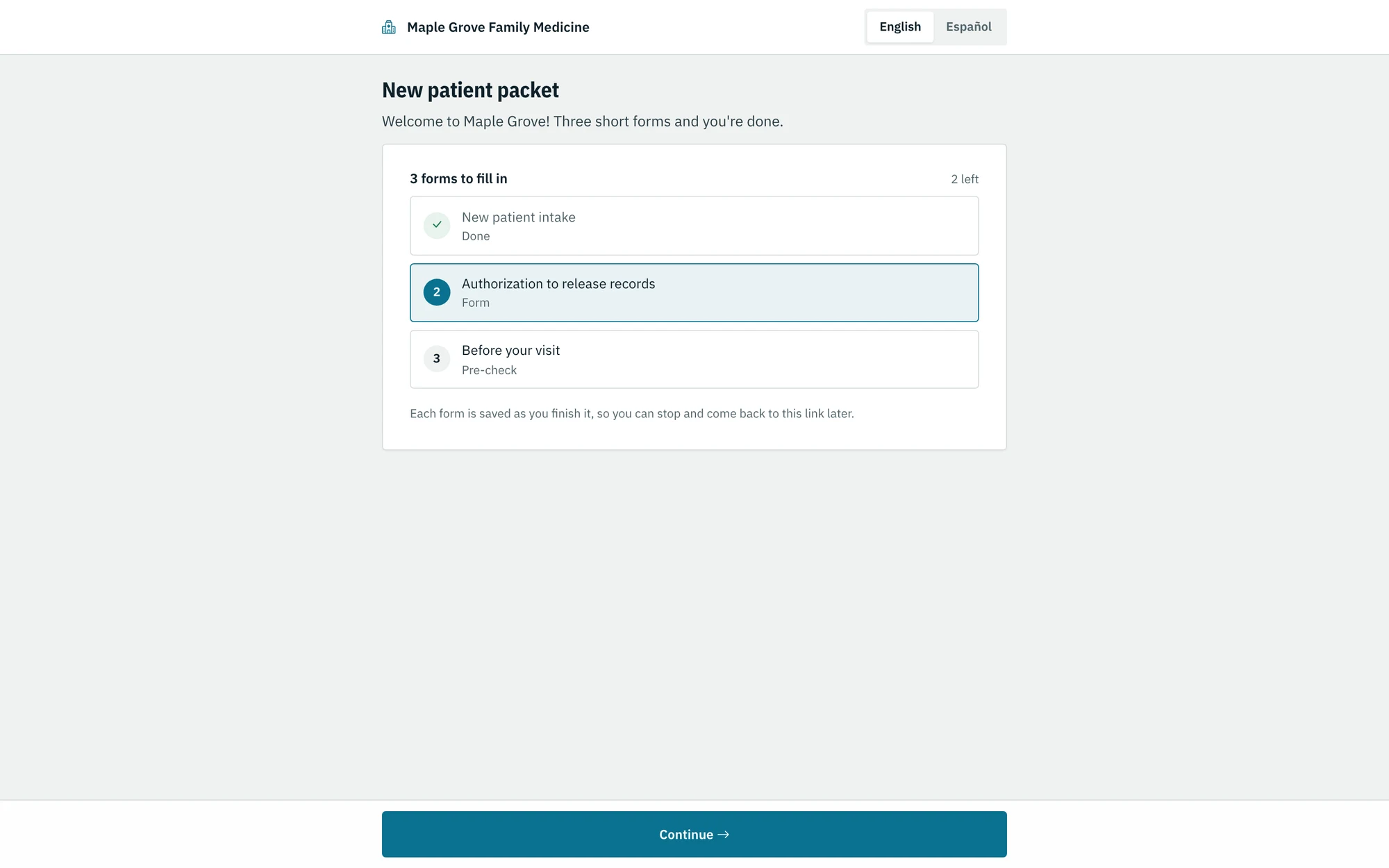
  • Send several forms together as one packet.
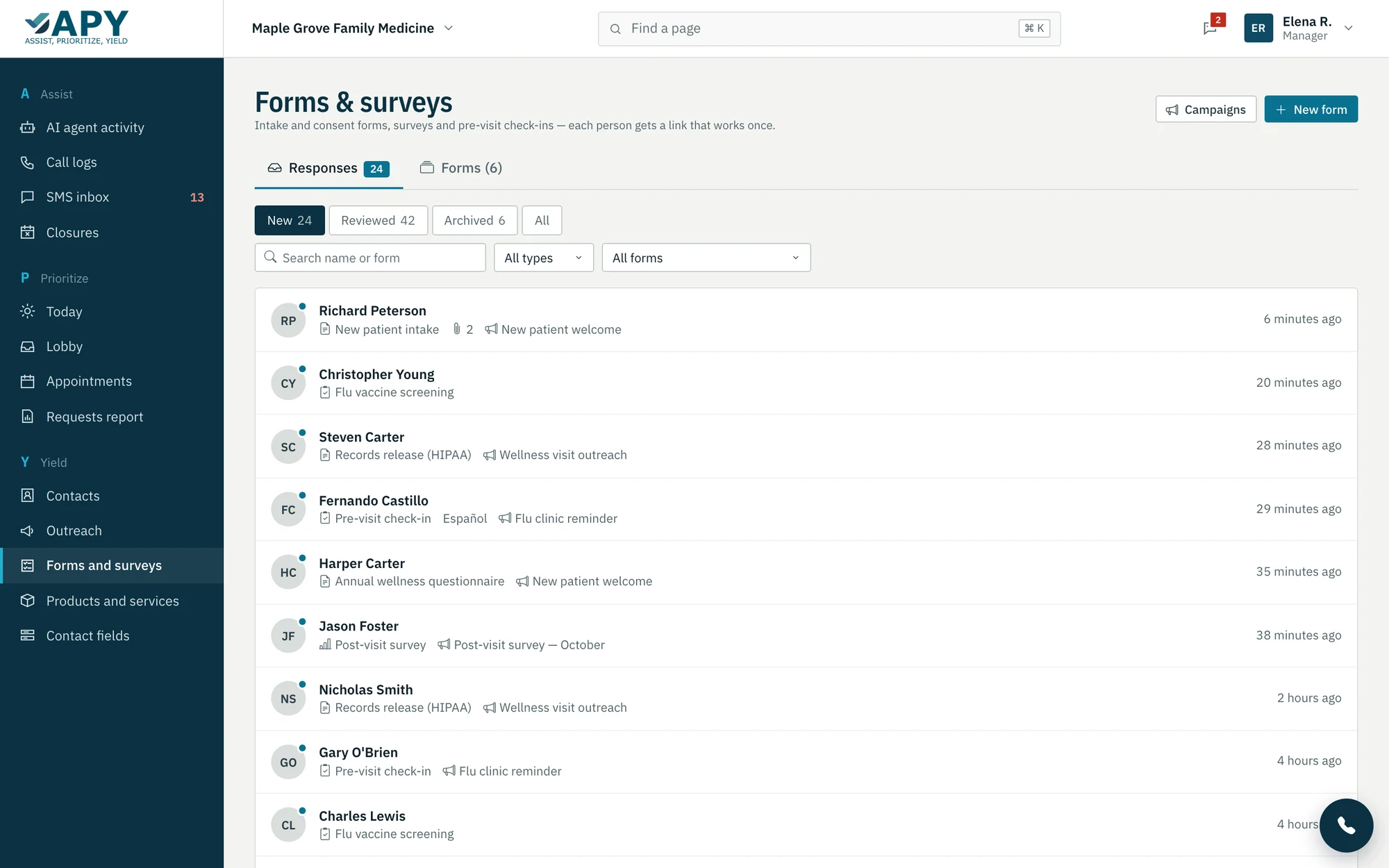
  • Responses land in an inbox to review, print or archive.
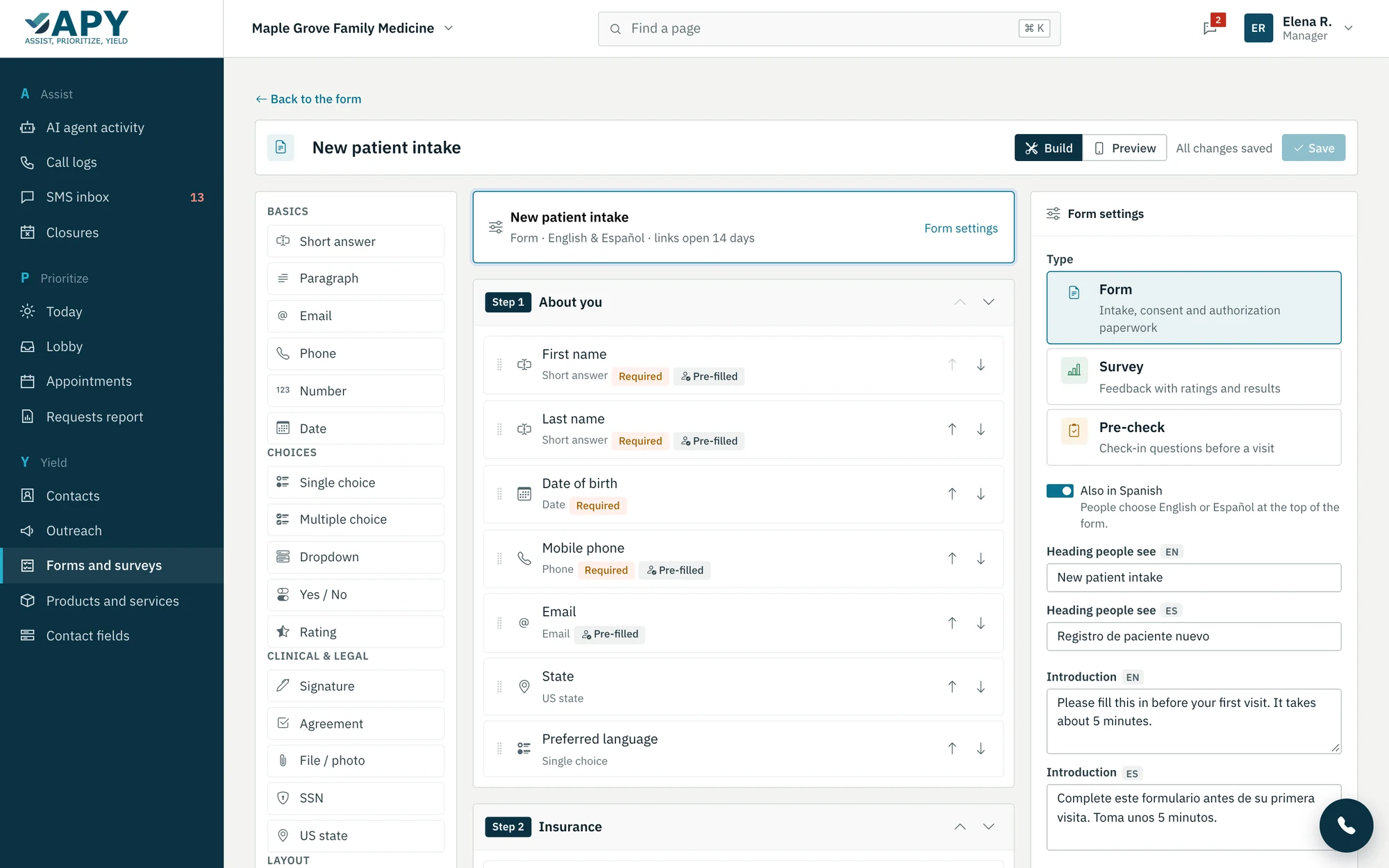
  • Build your own forms with a drag-and-drop builder.
A patient intake form on a phone, with an English and Español toggle.
Intake form on the patient's phoneDemo data, fictional
A patient packet page listing several forms to complete.
Patient packetDemo data, fictional
The drag-and-drop form builder with fields and a preview.
Form builderDemo data, fictional
The forms responses inbox listing submitted forms to review.
Responses inboxDemo data, fictional

07Yield

EHR schedule and patient chart

APY works today with eClinicalWorks and DrChrono. Using a different EHR? We'll connect APY to it on request. The schedule and the patient's history sit next to the phone and the inbox.

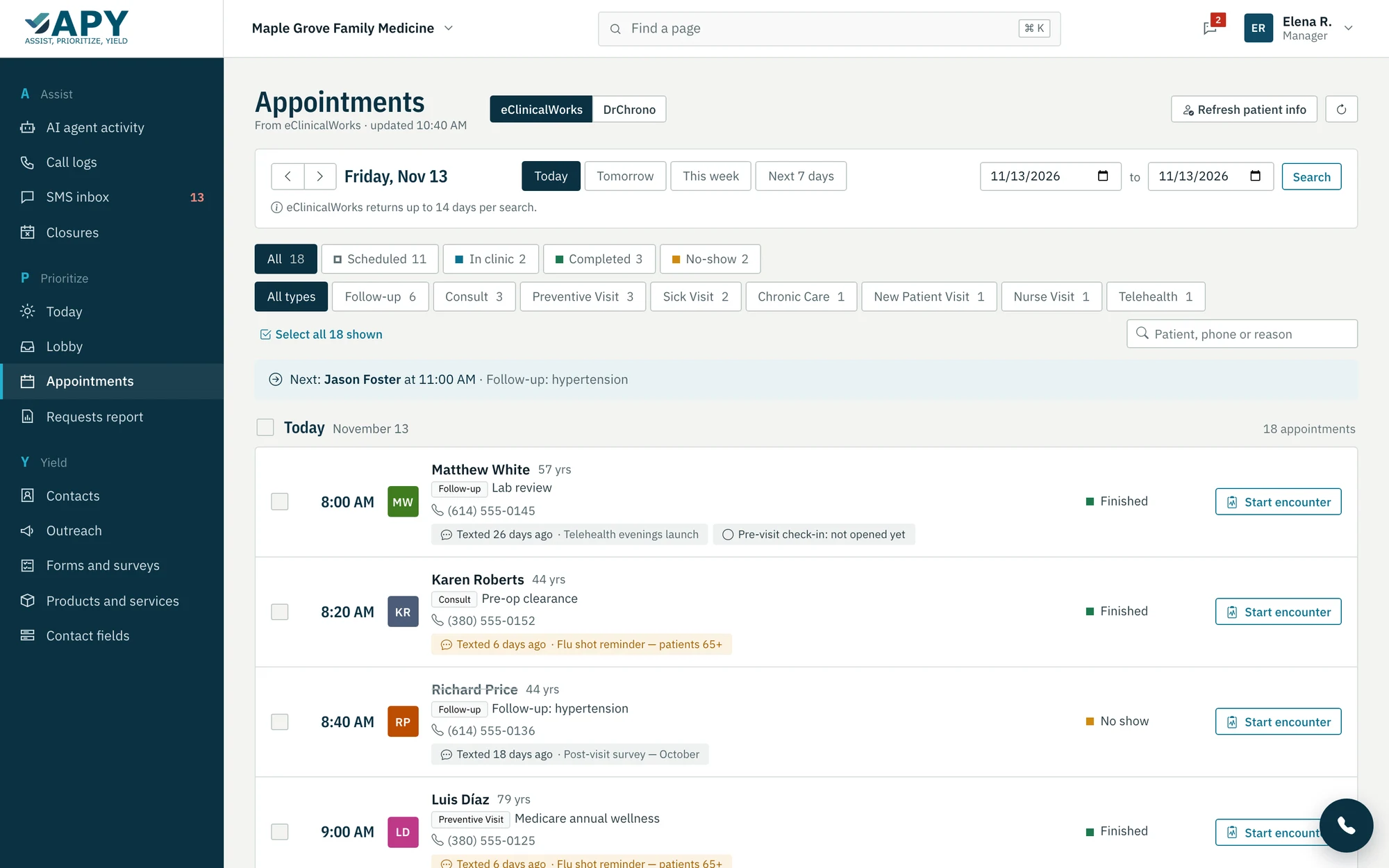
  • Today's appointments from the EHR: who is in clinic, who is next and who didn't show.
  • Open a visit as a request with "Start encounter".
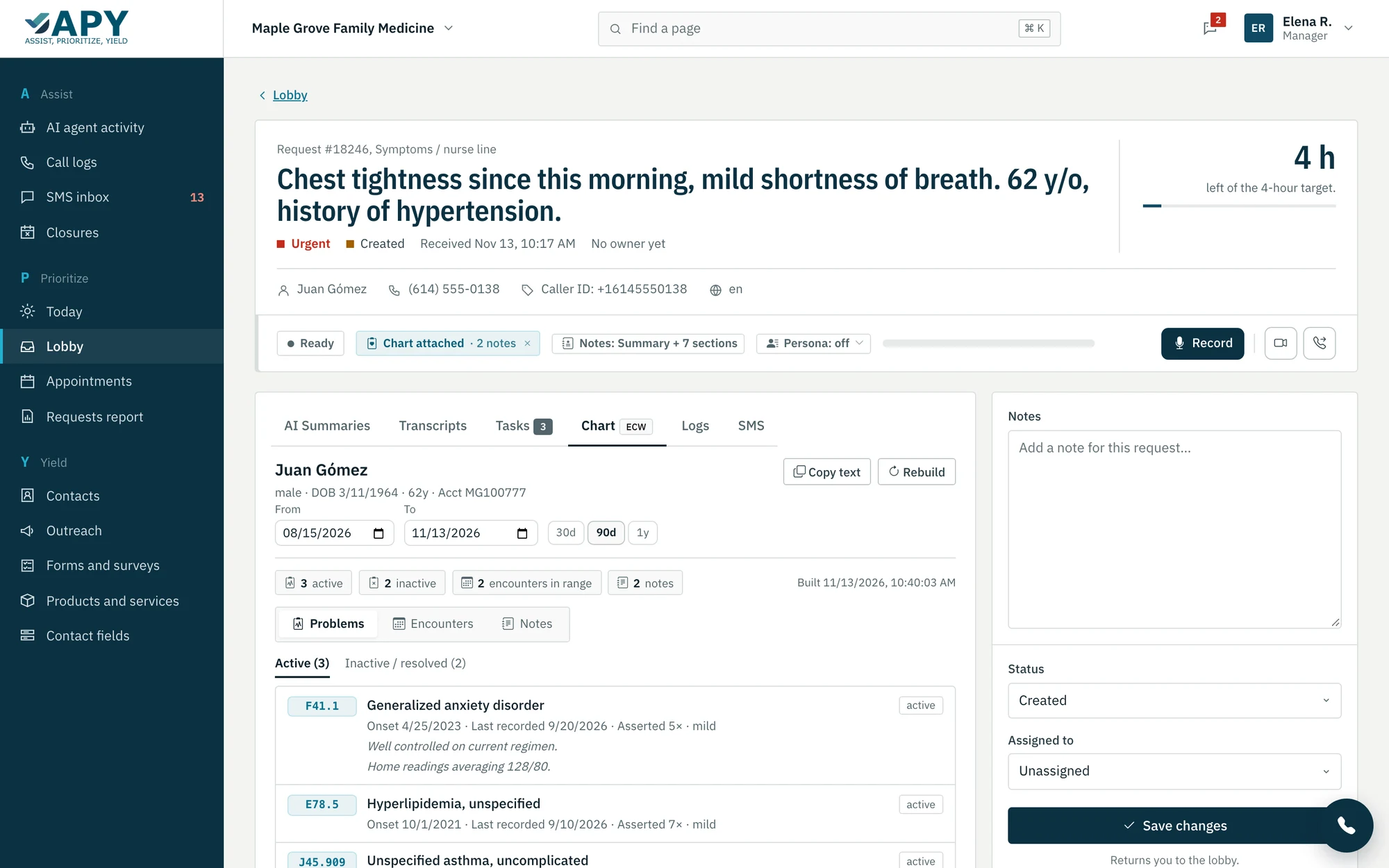
  • Build a patient chart summary (problems, encounters, notes) from the EHR on any request.
  • AI visit notes are written back into the EHR.
  • Select the day's patients and start a reminder campaign.
Your EHR schedule in APY (21 s)Demo data, fictional. Music: "Easy Lemon" by Kevin MacLeod (incompetech.com), licensed under CC BY 4.0.
Read the transcript

The schedule lives in the EHR. The phones live somewhere else.

APY shows today's eClinicalWorks or DrChrono schedule,

starts the encounter in one click,

and builds a summary of the patient's history from the EHR.

AI visit notes go back into the EHR, too.

Learn more at apytechnologies.com.

Today's appointments from the EHR, in columns per provider, with a patient detail panel.
Appointments from the EHRDemo data, fictional
A patient chart summary built from the EHR: problems, encounters and notes.
Patient chart summaryDemo data, fictional

08Prioritize

Call logs, reports and dashboard

See what came in, what was handled and what is still waiting.

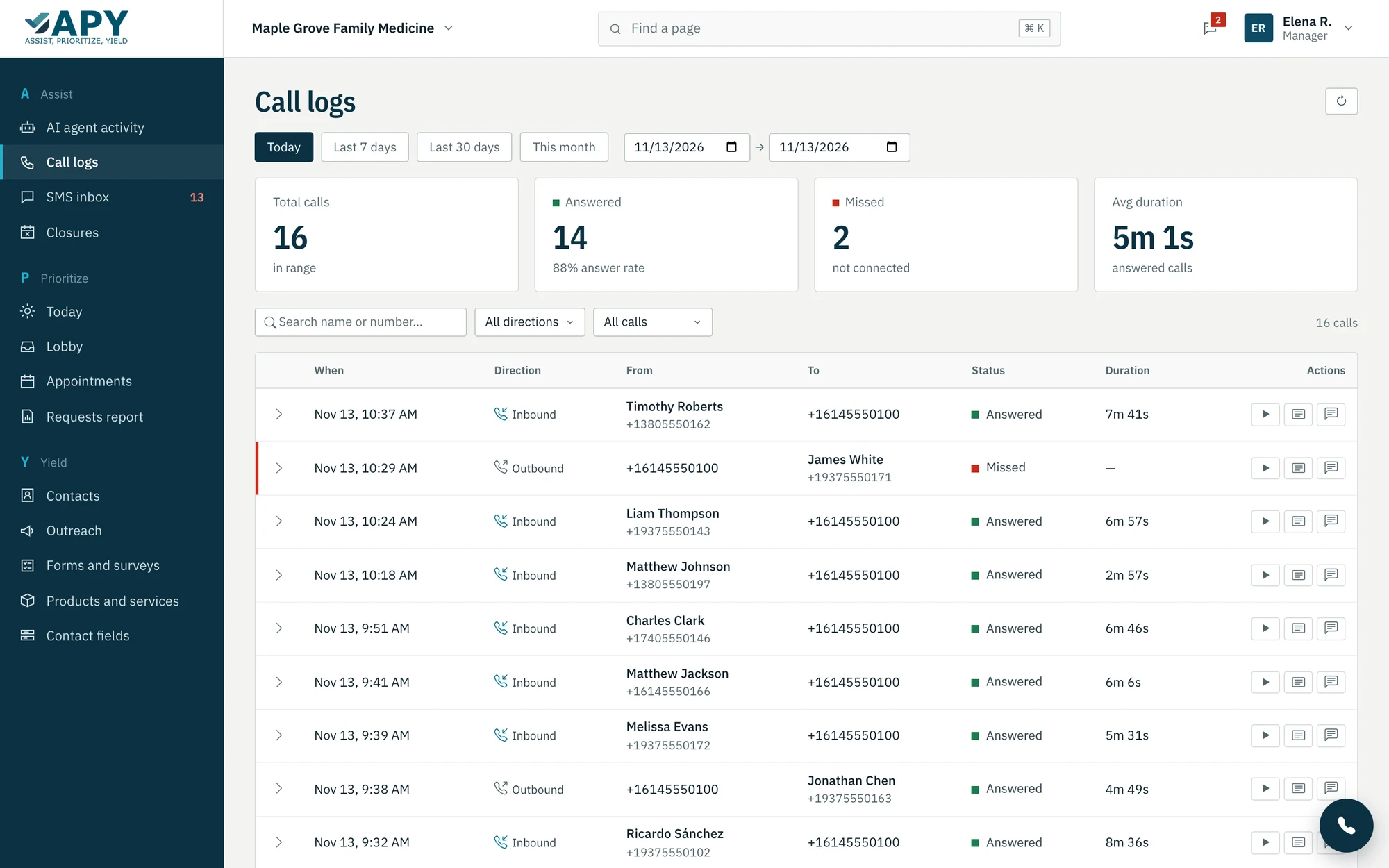
  • Call logs list every inbound and outbound call: answered or missed, duration, recording, AI summary and transcript.
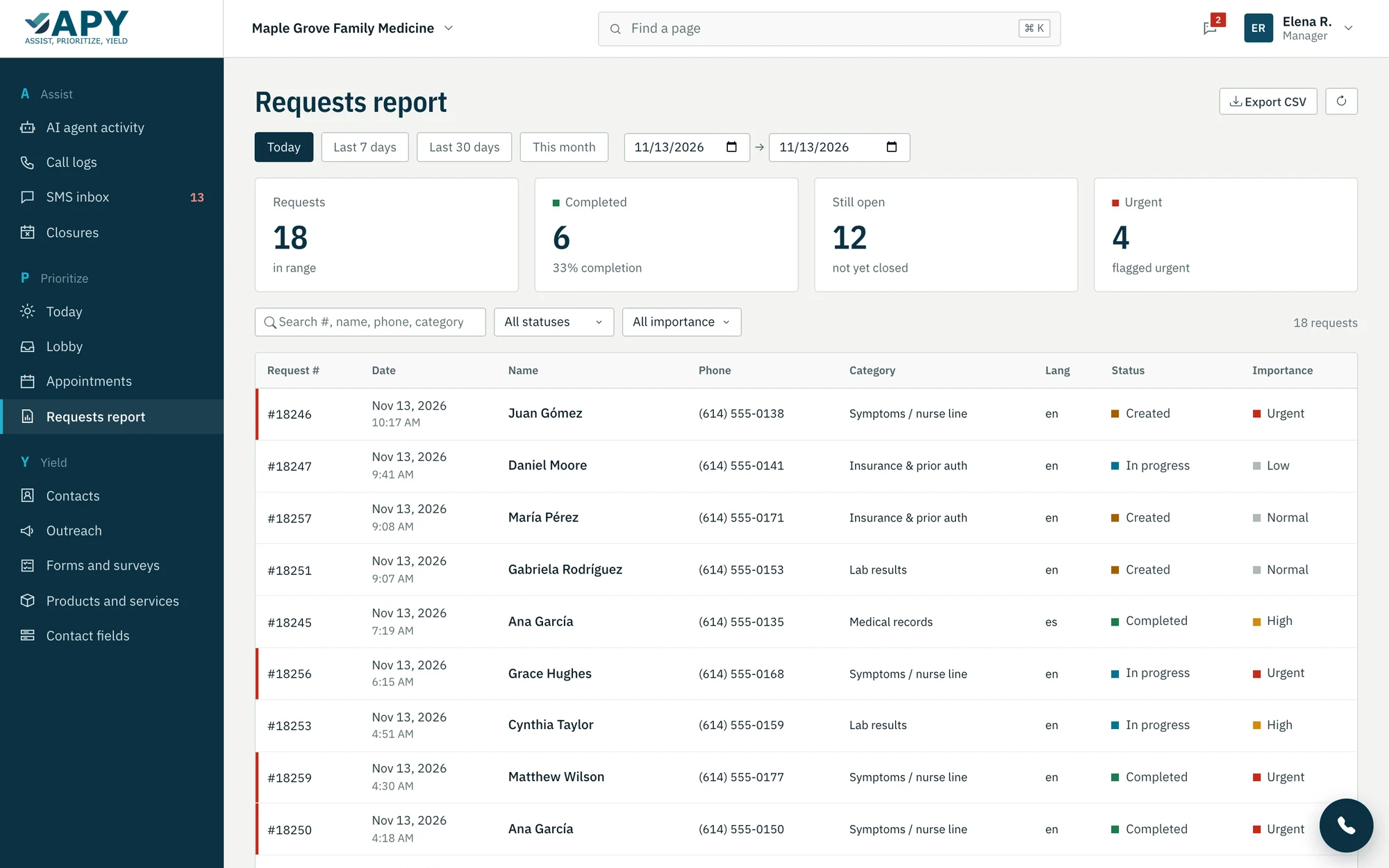
  • The requests report shows every request by date, status and importance.
  • The Today dashboard shows urgent requests waiting, requests closed within target, team load and what callers need.
Call logs with totals and a list of calls.
Call logsDemo data, fictional
The requests report: a table of requests with date, status and importance.
Requests reportDemo data, fictional
The Today dashboard with urgent requests, figures and team load.
Today dashboardDemo data, fictional

Also in APY

More tools your team will use every day

Team chat and team video calls

Chat and call with your team inside APY. Calls are recorded only when everyone agrees, with AI meeting notes and action items.
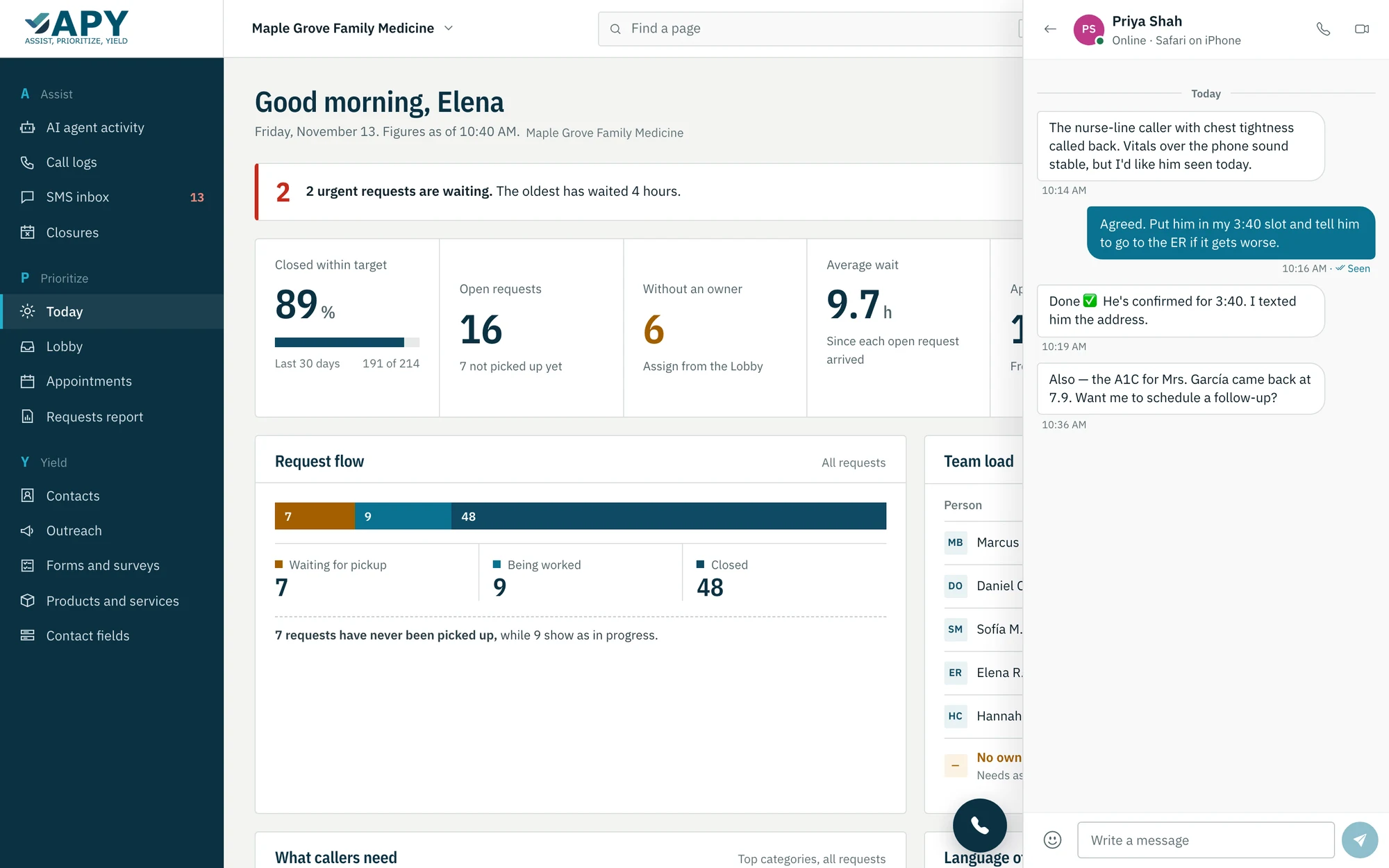

Team chat in APY with a conversation open.
Team chatDemo data, fictional

Patient video visits

Start a video visit from a request. The patient joins from a link on their phone, in English or Spanish.

A provider's video visit screen started from a request.
Video visitDemo data, fictional

Closures and holiday hours

Add holidays and reduced hours once, and the AI agents know your hours.
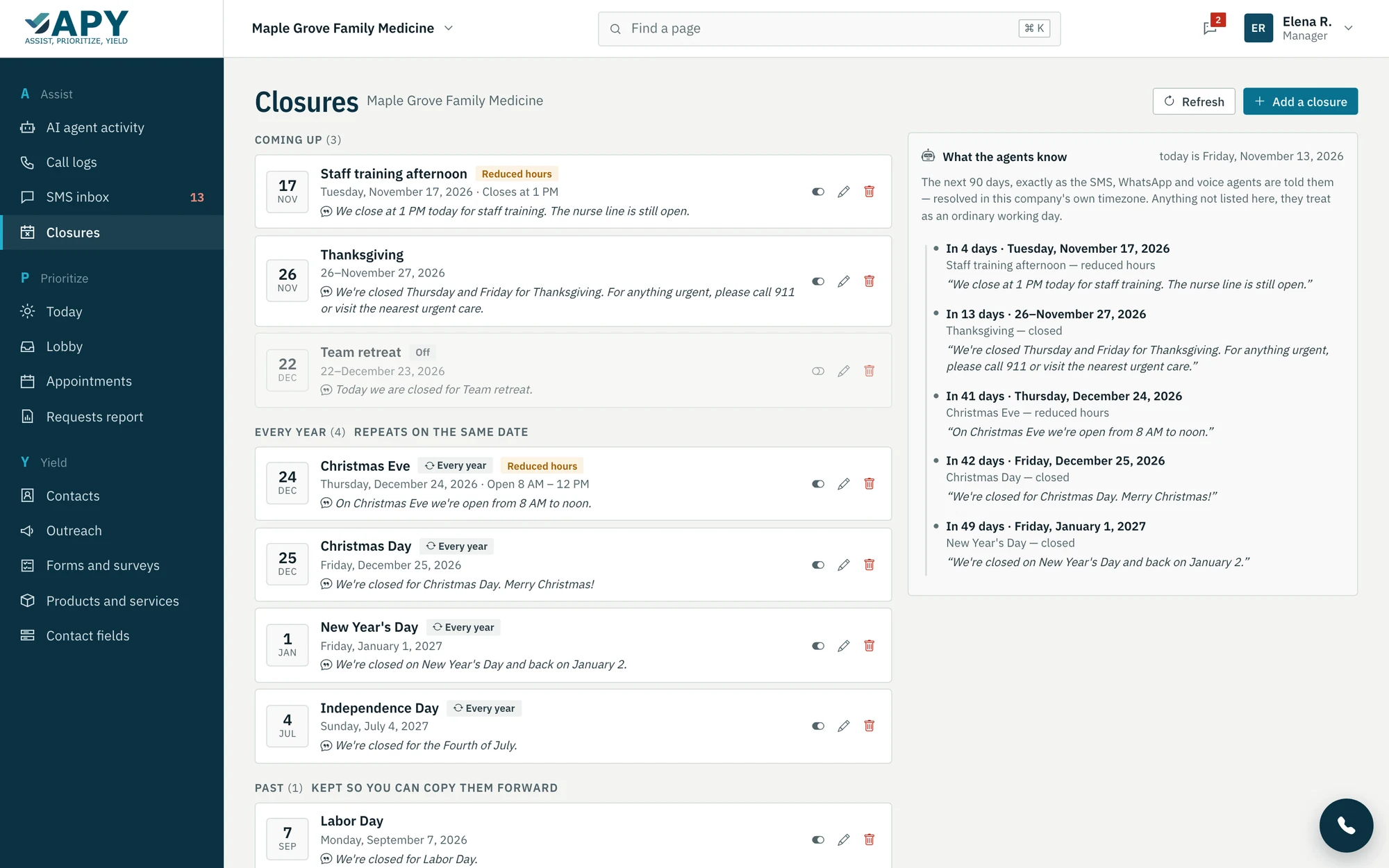
The closures settings listing upcoming holidays and reduced hours.
ClosuresDemo data, fictional

Contacts and custom fields

Keep patient contacts with tags and custom fields, such as insurance plan, primary provider or care program, to target outreach.

Privacy and security

Patient privacy, in writing

APY handles patient information as your business associate under HIPAA. Our commitments are in signed agreements, not just on this page.

  • A signed BAA with every practice

    We sign a Business Associate Agreement with every practice. It sets out how patient information is used, protected, kept and returned.

  • Our vendors sign BAAs too

    The phone, hosting and AI services that handle patient information for us have signed BAAs with us.

  • Not sold, not used to train public AI

    We don't sell personal information, and patient information isn't used to train public or general-purpose AI models.

Details are in our Privacy Policy and Terms of Service.

See APY with your own workflow

Tell us how your front desk handles calls, texts and forms today, and we'll walk you through APY with your practice in mind.

Works today with eClinicalWorks and DrChrono. Using a different EHR? We'll connect APY to it on request.